
Check out Youtube VPN for China at no cost!

A single Youtube VPN for China account for all devices.Youtube VPN for China Various plan options: 1-week to 1-year

  • A single Youtube VPN for China account for all devices.
  • Youtube VPN for China Various plan options: 1-week to 1-year
  • Prompt Youtube VPN for China customer support
  • Enjoy free time every day!
  • 30-day money-back guarantee 
You can acquire the free tier by checking in daily within the app.
Youtube VPN for China complimentary trial

olcw

有些用户在windows电脑上安装outline客户端时,可能会遇到报错或者在连接线路密钥时出现错误。
这种情况往往是由于系统中的v9虚拟网卡出现异常。我们需要先卸载当前的v9虚拟网卡,
然后在重新安装outline客户端时,系统会自动创建新的v9虚拟网卡。

请按照以下步骤操作:
1.打开系统的“设备管理器”,展开“网络适配器”的列表。
2.在列表中,右键点击卸载所有名为“V9”的虚拟网卡设备(Tap-windows-Adapter V9)。
您可能会发现有多个v9的虚拟网卡,务必将全部卸载。
如下图所示:
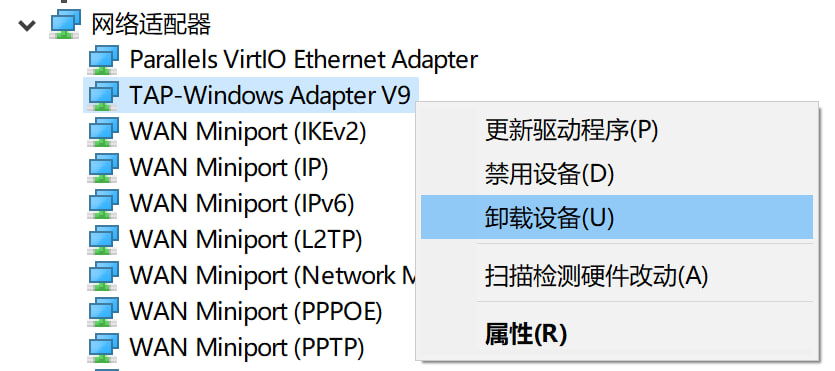
网络适配器
3.卸载已有的outline客户端。
4.重启您的计算机。
5.重启后,重新安装outline客户端,查看是否还有报错。
6.如果安装时没有错误,请尝试连接线路密钥,看是否能够成功连接。

附outline下载链接:

Outline Windows版本下载