Live Chat
Reach out to us via customer service:
Email Youtube VPN for China
You can reach us through the following methods:
- Email: [email protected]
- QQ: coming soon
- TG: coming soon
Commonly asked questions regarding Youtube VPN for China
How to utilize Youtube VPN for China
You can reach out to us via the following methods:
- Website: http://youtubejiasu.net
- Email: [email protected]
- QQ: coming soon
- Telegram: coming soon
- Should you try to log in on a new device and surpass the device limit, you'll be directed to the "Unbind Device" page, where you can disconnect any linked devices.
- Additionally, you can go to "Menu" > "App Settings" > "Device List" to choose and unbind a device that you prefer.
Forgetting usernames or passwords is something that happens often, and we strive to simplify the recovery process. Here are your options:
- If you've forgotten your username, kindly reach out to us and include a screenshot of your payment record.
- If you've misplaced your password, simply utilize the "forgot password" feature found in the app.
Global Mode: This option enables VPN for all online activities, which may result in slower performance for local websites and applications.
Split Mode: This option utilizes VPN solely for websites that are restricted due to geographic limitations, like Google, YouTube, and Netflix, while allowing access to local networks for Chinese websites.
You can modify the routing mode in the App Settings.
If you're experiencing difficulties accessing specific websites or apps, consider switching to "Global Mode."
Please reach out to us if you require any further assistance.
You can accumulate points by referring friends and utilize them to claim rewards. Here’s how it works:
- First, obtain your "Referral Code" or "Referral Link" by navigating to "Share & Gift" and clicking on "Share Now." You can then share it with friends or post it on your social media accounts or blog.
- You will earn 1 point for every friend who successfully refers, which can be exchanged for a 1-day pass.
- Your redeemed plans will be visible in the "My Account" section after you redeem your points.
- For a referral to count, your referred friend must download and begin using the app. If they download the app but do not use it, you will not receive your referral point until they start using it.
You can reach out to us via the following methods:
- Website: http://youtubejiasu.net
- Email: [email protected]
- QQ: coming soon
- Telegram: coming soon
The split mode functionality in Youtube VPN for China caters to web applications such as Telegram, WhatsApp, or Gmail, which operate using HTTPS. This mode can modify the routing for both HTTP (port 80) and HTTPS (port 443), allowing access to the web interfaces of these applications. Nevertheless, the application versions might utilize different ports.
To guarantee access, the following steps should be taken:
- Utilize the "Global Mode" option found in the routing settings.
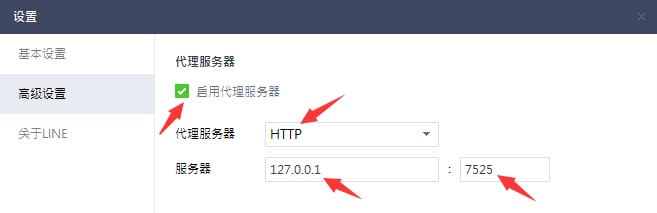
- Adjust the proxy settings of the application. For instance, here’s how to modify the proxy settings for the LINE app:
Frequent reasons for network problems include:
- Reduced local internet speeds (without a VPN)
- Increased user traffic at specific VPN server sites
To address these issues, consider the following approaches:
- Verify your local internet speed by temporarily turning off the VPN
- Experiment with various network connections like WiFi, 4G, or 5G with the VPN disabled to detect any connectivity issues. For instance, if your WiFi connection is unstable, switch to a mobile data connection.
- Disable the VPN, choose a different server location, and then reconnect
- If you wish to remain connected to the same geographical area, disconnect and reconnect, as this may connect you to another server within that region.
- Keep performing these tests until you discover the best server for your needs.
At times, there may be a delay in processing payments through the gateway. Here are the key points to remember:
- We support various payment methods, such as Alipay, WeChat QR Code Scanning Payment, and UnionPay.
- If you have successfully made a payment but do not see the corresponding plan in your account right away, please wait about 5 minutes, then log out and log back in.
- If you continue to encounter issues after following the above steps, please take a screenshot of your payment confirmation and contact us for further assistance.
这种情况通常是因为系统代理地址设置不当或第三方软件的屏蔽和阻碍引起的。解决方法是手动添加Youtube VPN for China的科学上网代理地址。
请按照以下步骤操作:
- 在 Windows 系统中搜索并打开“Internet 选项”。
- 转到“连接”标签页。
- 点击底部右侧的“局域网设置”按钮。
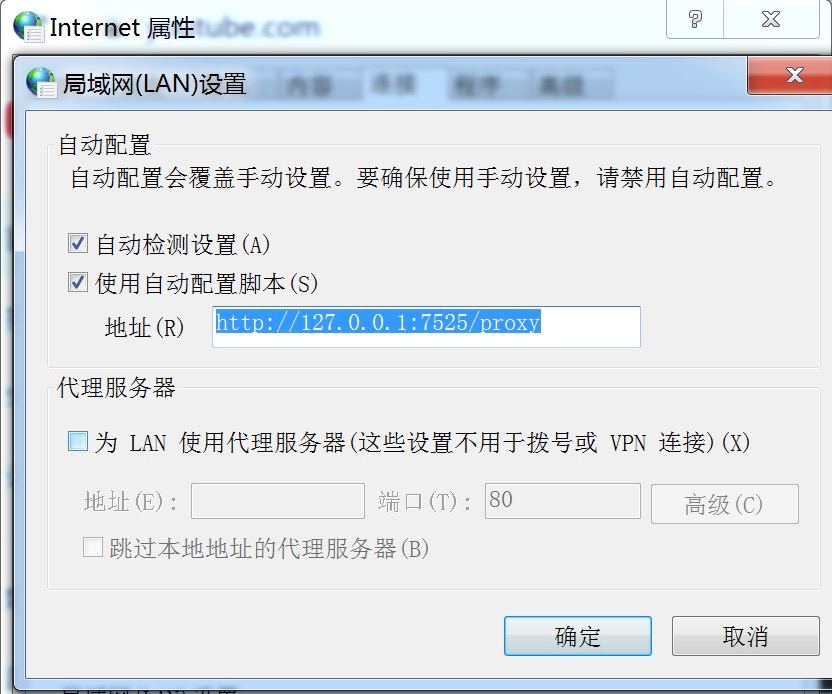
- 在局域网(LAN)设置页面的“使用自动配置脚本”选项中勾选√,并在下方的地址框中输入:http://127.0.0.1:7525/proxy。
- 点击右侧底部的“确定”按钮,然后再次点击“确定”以关闭 Internet 属性。
- 最后,请彻底关闭浏览器,然后重新打开浏览器即可享受科学上网。
如下图:
How to set up Youtube VPN for China
During the installation of the Youtube VPN for China app on Windows, you might face alerts from your antivirus or firewall software since VPN applications can be viewed as potential risks. If you receive such alerts, it is advisable to select options like "allow," "agree," or "trust" to proceed with the installation. This step is crucial for the VPN to operate effectively, as it requires adjustments to proxy settings. Denying these permissions could disrupt the proper functioning of Youtube VPN for China.
About Youtube VPN for China
Youtube VPN for China offers a 30-day money-back guarantee, allowing you to try out all its features without any risk. If you determine that it doesn’t meet your needs within the first 30 days, you can request a full refund. Here’s how to go about it:
- Visit the official Youtube VPN for China website.
- Select a subscription plan that suits your requirements, with options ranging from monthly to yearly.
- Sign up using your email and make your payment through credit card or PayPal.
- Download and set up Youtube VPN for China on your devices, which may include iOS, Windows, Android, and macOS.
- Follow the instructions provided to configure Youtube VPN for China and log into your new account to begin using the services.
- If you are not satisfied with the service during the first 30 days, reach out to Youtube VPN for China's customer support to request a refund.
Please be aware: It is crucial to fully understand Youtube VPN for China's refund policy. If you are unhappy with the service, you can easily start the refund request process.
To create a Youtube VPN for China Membership Account:
- Go to the Youtube VPN for China Website: Launch your web browser and navigate to the official Youtube VPN for China site.
- Choose a Subscription Plan: Select the subscription option that best fits your needs, whether it’s for one month, six months, or a year.
- Sign Up for an Account: Click on the subscribe or purchase button, and register using your email address, which will function as your account ID.
- Finalize Your Payment: Select your preferred payment method, such as a credit card or PayPal, and complete the transaction.
- Receive Email Confirmation and Setup Instructions: After the payment is processed, Youtube VPN for China will send a confirmation email with setup instructions, a download link, and an activation code.
- Install and Configure: Follow the guidelines provided in the email or on the website to download and install Youtube VPN for China on your device. When you launch the app for the first time, enter the activation code or your login credentials.
- Begin Using Our Service: Once the app is installed and you’re logged in, choose a server location to start your secure browsing experience.
Important Note: Always make sure to buy your subscription directly from the official Youtube VPN for China website or authorized distributors. Avoid purchasing from unapproved sources or third-party sellers to safeguard your financial and personal information.
To register for Youtube VPN for China, you would typically follow these steps:
Registration Steps:
- Access the official Youtube VPN for China website using your preferred web browser.
- Select a subscription plan that fits your requirements.
- Enter a valid email address to receive your Youtube VPN for China account information and installation guidelines.
- Choose your preferred payment method, like a credit card or PayPal.
- Follow the payment instructions provided by Youtube VPN for China to finalize the transaction.
- Upon completing the payment, check your email for a confirmation message and additional setup instructions.
- Install the Youtube VPN for China application by following the guidance given in the email or on the website.
- Log into the application with your new account details, select a server, click "Connect," and start using Youtube VPN for China.
- (Optional) You can follow similar steps to install and set up Youtube VPN for China on other devices.
Always keep your account information confidential and adhere to Youtube VPN for China’s service terms and usage policies for safe and legal use of the service. If you encounter any issues during the registration or setup process, Youtube VPN for China customer support is usually available to help.
Sharing a paid Youtube VPN for China account generally means that a subscriber provides their login information, including username and password, to others. This enables those who have not paid for the service to benefit from a paid subscription. However, this behavior presents multiple potential downsides.
Legal and Contractual Risks:
- Breach of Service Agreement: Sharing your Youtube VPN for China account is frequently against the service agreement, which typically forbids account sharing.
- Potential Legal Consequences: Sharing an account could result in legal ramifications, as it may be deemed a breach of copyright laws or involvement in unlawful activities.
Security Risks:
- Risk to Personal Data: Granting others access to your Youtube VPN for China account heightens the risk to your personal data security, particularly if their actions are unknown to you.
- Privacy Concerns: There is a privacy risk if others engage in activities under your account, which will be linked back to you.
Performance Issues:
- Reduced Service Quality: If many users connect to Youtube VPN for China through one account, it may result in slower connection speeds and inferior service performance.
- Limits on Simultaneous Connections: Youtube VPN for China restricts the total number of devices that can connect concurrently on a single account, which can be quickly reached with shared access.
Reputational and Ethical Issues:
- Impacts on Provider Revenue: Sharing accounts can lead to a reduction in the provider's revenue, jeopardizing the sustainability of their services and products.
Although sharing a Youtube VPN for China account may appear to be a financially sensible choice, it introduces a range of risks and challenges. It is strongly recommended that individuals keep separate accounts to guarantee a secure, legal, and high-quality service experience.
A cracked version of Youtube VPN for China is an unauthorized alteration of the official app that permits usage without payment. Although its no-cost appeal may be tempting, there are considerable risks and concerns related to its use:
Legal Issues
- Intellectual Property Violations: Using cracked software is illegal and violates intellectual property rights in various jurisdictions.
- Legal Consequences: Engaging with cracked software can lead to legal troubles, potentially resulting in fines or other penalties.
Security Risks
- Malware Threat: Cracked versions often contain malware, viruses, or other harmful entities.
- Risk to Personal Information: Your sensitive information, such as usernames, passwords, and financial details, may be at greater risk of being compromised.
- Software Performance Issues: Cracked software tends to underperform compared to its legitimate version.
Privacy Risks
- Poor Data Protection: There is no guarantee that your data is securely encrypted or safeguarded when using cracked software.
- Possibility of Surveillance and Logging: Cracked versions may not follow the privacy standards established by legitimate providers and could log or monitor your online activities.
Ethical and Reputation Concerns
- Moral Considerations: Using cracked software undermines the hard work and commitment of developers.
- Financial Consequences: The use of cracked software reduces corporate profits, jeopardizing their ability to operate.
Choosing a licensed service from a reputable provider is the best approach if you care about your data security and privacy and want to adhere to ethical and legal standards. Numerous trustworthy providers offer free trials or refund options, allowing you to assess their services safely.
Download the official Youtube VPN for China using the link below.
Download the official Youtube VPN for China by clicking the link below.
You can reach out to us via the following methods:
- Website: http://youtubejiasu.net
- Email: [email protected]
- QQ: coming soon
- Telegram: coming soon
We have observed that some users find it difficult to select a server after picking a region.
To make this easier, we now only show regions. Heibao will automatically connect you to the top-performing server in your selected region. Here are the details:
- The location menu will exclusively show regions, but each region includes hundreds of servers. When you choose a region, Heibao automatically connects you to the server that provides the best performance based on your network conditions.
- If you are not happy with the server you are connected to, you can disconnect and reconnect to the same region to get linked to a different server.
- You can continue this process until you find a server that suits your requirements.
Absolutely! Youtube VPN for China grants ongoing free access through its "Daily Check-in" feature. By checking in each day, you’ll obtain 15 minutes of complimentary usage. Furthermore, you can accumulate points by referring friends, which you can trade for a 1-day pass. Here are the details:
- Youtube VPN for China enables continual access via its daily check-in feature.
- Initially, newcomers receive 15 minutes of free time; subsequently, checking in daily earns you an additional 15-minute free time.
- There are no data limitations during the free period, although complimentary access is restricted to servers in certain locations.
- Accumulate points through our referral program, which can be exchanged for various subscription plans.
Definitely! Youtube VPN for China supports multi-device connectivity under a single account, with the actual number of allowable devices depending on your subscription plan. Here are more details:
- You can log into your Youtube VPN for China account from any device including Android, iOS, macOS, or Windows by using the same user information.
- The number of devices you can connect simultaneously varies with the plan you select. Theoretically, there's no upper limit to how many devices can be linked.
- If you try to connect more devices than your plan permits, the system will ask you to disconnect other devices before logging in.
- Each device can be associated with up to two Youtube VPN for China accounts whether it is a computer or a mobile device.
Absolutely, we do provide a free trial! Each day, we offer a trial period that lasts for 15 minutes. To initiate your trial, simply follow these instructions:
- Download the Youtube VPN for China app
- Sign up for a new account
- Click the "Daily Check-In" button located on the main page
Please be aware: The free trial promotion is temporary and may be discontinued at any time without prior notice.
Youtube VPN for China prioritizes privacy, assuring that it does not maintain any logs of user activity or connections. Additionally, the company guarantees that no information is stored that could link specific network actions or behaviors to individual users.
Questions about iOS
You can link multiple devices to one account, with the number of devices allowed depending on your selected subscription plan. Important points to remember about this feature include:
- Accounts can be accessed on various platforms, no matter where the account was initially registered (e.g., Android, iOS, macOS, Windows).
- The maximum number of supported devices varies according to the subscription plan, theoretically permitting an unlimited number of devices per account.
- Users will receive notifications if the number of connected devices surpasses the plan's limit, urging them to remove extra devices upon signing in.
- Each device can be associated with up to two accounts, whether it's a computer or a mobile device.
Certainly! You have the opportunity to utilize Youtube VPN for China at no cost indefinitely through the "Daily Check-in" feature. Each day, you receive 15 minutes of complimentary usage time. Furthermore, you can earn 1 point for every successful referral, which can be exchanged for a 1-day pass. Here are the key highlights:
- Youtube VPN for China promises to provide the "Daily Check-in" feature for free indefinitely.
- New users get an initial 15 minutes of free usage time, and additional 15 minutes can be earned by completing the check-in process the next day.
- During the free trial, you are free to use our services without any restrictions on usage. However, please be aware that server access is limited to locations included in the free plan.
- You can accumulate points by engaging in our referral program, which can then be redeemed for various types of plans.
Of course! We offer a 15-minute daily trial period. To get started with your trial, please follow these steps:
- Download the Youtube VPN for China app.
- Sign up for a new account.
- Press the "Daily Check-In" button on the app's main screen.
Please note that the availability of this free trial may change and could be discontinued at any time without notice.
Youtube VPN for China prioritizes user privacy by guaranteeing that no logs of activities or connections are maintained. Additionally, the VPN service refrains from storing any information that could potentially be used to trace particular network actions or behaviors back to an individual user.
You can reach out to us via the following methods:
- Website: http://youtubejiasu.net
- Email: [email protected]
- QQ: coming soon
- Telegram: coming soon
You can reach out to us via the following methods:
- Website: http://youtubejiasu.net
- Email: [email protected]
- QQ: coming soon
- Telegram: coming soon
While free Youtube VPN for China and proxy services exist, using free Youtube VPN for China is typically discouraged due to their often inadequate privacy and security measures compared to paid Youtube VPN for China. Free Youtube VPN for China often underperform, may jeopardize your data by selling it, and generally fail to offer adequate protection against potential cyber threats.
Although iPhones allow you to connect to VPN servers via their system settings, this functionality by itself does not deliver comprehensive VPN services. To take full advantage of VPN features, it's necessary to connect to an external VPN provider like Youtube VPN for China.
Utilizing a VPN on your iOS device ensures that your online activities remain highly secure. You can choose from a diverse selection of VPN server locations, enabling you to alter your device's IP address, protect your data on public Wi-Fi, and reach content that might otherwise be unavailable.
Youtube VPN for China provides a protective shield for your iOS device while you're online, establishing a safe barrier against issues such as surveillance, tampering, and content restrictions. With Youtube VPN for China, you can indulge in streaming, online shopping, and web browsing confidently, assured that your privacy and security are thoroughly safeguarded.
Questions about Android
Certainly! You have the opportunity to utilize Youtube VPN for China at no cost indefinitely through the "Daily Check-in" feature. Each day, you receive 15 minutes of complimentary usage time. Furthermore, you can earn 1 point for every successful referral, which can be exchanged for a 1-day pass. Here are the key highlights:
- Youtube VPN for China promises to provide the "Daily Check-in" feature for free indefinitely.
- New users get an initial 15 minutes of free usage time, and additional 15 minutes can be earned by completing the check-in process the next day.
- During the free trial, you are free to use our services without any restrictions on usage. However, please be aware that server access is limited to locations included in the free plan.
- You can accumulate points by engaging in our referral program, which can then be redeemed for various types of plans.
Of course! We offer a 15-minute daily trial period. To get started with your trial, please follow these steps:
- Download the Youtube VPN for China app.
- Sign up for a new account.
- Press the "Daily Check-In" button on the app's main screen.
Please note that the availability of this free trial may change and could be discontinued at any time without notice.
Youtube VPN for China prioritizes user privacy by guaranteeing that no logs of activities or connections are maintained. Additionally, the VPN service refrains from storing any information that could potentially be used to trace particular network actions or behaviors back to an individual user.
You can reach out to us via the following methods:
- Website: http://youtubejiasu.net
- Email: [email protected]
- QQ: coming soon
- Telegram: coming soon
You can reach out to us via the following methods:
- Website: http://youtubejiasu.net
- Email: [email protected]
- QQ: coming soon
- Telegram: coming soon
By configuring a VPN on your Android device, you can ensure that all your activities remain secure. Just connect to one of our numerous VPN servers to change your device's IP address, protect your data on public Wi-Fi networks, and access restricted websites and services.
A VPN creates a virtual network by linking several computers together in a virtual manner. Originally designed for speed and security, its main purposes now are privacy, encryption, and accessing restricted content.
Questions about Windows
You can link multiple devices to one account, with the number of devices allowed depending on your selected subscription plan. Important points to remember about this feature include:
- Accounts can be accessed on various platforms, no matter where the account was initially registered (e.g., Android, iOS, macOS, Windows).
- The maximum number of supported devices varies according to the subscription plan, theoretically permitting an unlimited number of devices per account.
- Users will receive notifications if the number of connected devices surpasses the plan's limit, urging them to remove extra devices upon signing in.
- Each device can be associated with up to two accounts, whether it's a computer or a mobile device.
Certainly! You have the opportunity to utilize Youtube VPN for China at no cost indefinitely through the "Daily Check-in" feature. Each day, you receive 15 minutes of complimentary usage time. Furthermore, you can earn 1 point for every successful referral, which can be exchanged for a 1-day pass. Here are the key highlights:
- Youtube VPN for China promises to provide the "Daily Check-in" feature for free indefinitely.
- New users get an initial 15 minutes of free usage time, and additional 15 minutes can be earned by completing the check-in process the next day.
- During the free trial, you are free to use our services without any restrictions on usage. However, please be aware that server access is limited to locations included in the free plan.
- You can accumulate points by engaging in our referral program, which can then be redeemed for various types of plans.
Of course! We offer a 15-minute daily trial period. To get started with your trial, please follow these steps:
- Download the Youtube VPN for China app.
- Sign up for a new account.
- Press the "Daily Check-In" button on the app's main screen.
Please note that the availability of this free trial may change and could be discontinued at any time without notice.
Youtube VPN for China prioritizes user privacy by guaranteeing that no logs of activities or connections are maintained. Additionally, the VPN service refrains from storing any information that could potentially be used to trace particular network actions or behaviors back to an individual user.
You can reach out to us via the following methods:
- Website: http://youtubejiasu.net
- Email: [email protected]
- QQ: coming soon
- Telegram: coming soon
You can reach out to us via the following methods:
- Website: http://youtubejiasu.net
- Email: [email protected]
- QQ: coming soon
- Telegram: coming soon
By utilizing Youtube VPN for China on your Windows computer, you can ensure that everything you do remains secure. When you connect to one of our Youtube VPN for China server locations, your device's IP address will be replaced with a new one, protecting your data on potentially unsafe Wi-Fi networks and allowing access to blocked websites and services.
Although free Youtube VPN for China and proxy services are available, free Youtube VPN for China is generally not recommended because they often lack the privacy and security measures found in paid Youtube VPN for China Free Youtube VPN for China frequently underperform, might endanger your data by selling it, and usually do not provide sufficient protection against potential cyber attacks.
Getting started is easy! Just sign up for Youtube VPN for China, install the app on your device, and press the "On" button that appears on your screen.
Although Windows 10 and 11 include a VPN client, it does not offer a comprehensive VPN service. To fully enjoy the advantages, you will need to connect to a third-party VPN such as Youtube VPN for China. The installation process can be somewhat challenging, so many prefer to utilize the Youtube VPN for China app for convenience.
A VPN establishes a virtual network by connecting various computers over the internet. Initially centered on speed and security, it now primarily functions for privacy, encryption, and accessing restricted content.
Questions about macOS
You can link multiple devices to one account, with the number of devices allowed depending on your selected subscription plan. Important points to remember about this feature include:
- Accounts can be accessed on various platforms, no matter where the account was initially registered (e.g., Android, iOS, macOS, Windows).
- The maximum number of supported devices varies according to the subscription plan, theoretically permitting an unlimited number of devices per account.
- Users will receive notifications if the number of connected devices surpasses the plan's limit, urging them to remove extra devices upon signing in.
- Each device can be associated with up to two accounts, whether it's a computer or a mobile device.
Certainly! You have the opportunity to utilize Youtube VPN for China at no cost indefinitely through the "Daily Check-in" feature. Each day, you receive 15 minutes of complimentary usage time. Furthermore, you can earn 1 point for every successful referral, which can be exchanged for a 1-day pass. Here are the key highlights:
- Youtube VPN for China promises to provide the "Daily Check-in" feature for free indefinitely.
- New users get an initial 15 minutes of free usage time, and additional 15 minutes can be earned by completing the check-in process the next day.
- During the free trial, you are free to use our services without any restrictions on usage. However, please be aware that server access is limited to locations included in the free plan.
- You can accumulate points by engaging in our referral program, which can then be redeemed for various types of plans.
Of course! We offer a 15-minute daily trial period. To get started with your trial, please follow these steps:
- Download the Youtube VPN for China app.
- Sign up for a new account.
- Press the "Daily Check-In" button on the app's main screen.
Please note that the availability of this free trial may change and could be discontinued at any time without notice.
Youtube VPN for China prioritizes user privacy by guaranteeing that no logs of activities or connections are maintained. Additionally, the VPN service refrains from storing any information that could potentially be used to trace particular network actions or behaviors back to an individual user.
You can reach out to us via the following methods:
- Website: http://youtubejiasu.net
- Email: [email protected]
- QQ: coming soon
- Telegram: coming soon
You can reach out to us via the following methods:
- Website: http://youtubejiasu.net
- Email: [email protected]
- QQ: coming soon
- Telegram: coming soon
You can reach out to us via the following methods:
- Website: http://youtubejiasu.net
- Email: [email protected]
- QQ: coming soon
- Telegram: coming soon
While free Youtube VPN for China and proxy services exist, using free Youtube VPN for China is typically discouraged due to their often inadequate privacy and security measures compared to paid Youtube VPN for China. Free Youtube VPN for China often underperform, may jeopardize your data by selling it, and generally fail to offer adequate protection against potential cyber threats.
The Youtube VPN for China app for Mac adds an extra level of security between your device and the internet, facilitating secure and private online actions like browsing, shopping, and streaming. This VPN not only safeguards your identity from monitoring and data collection online, but it also lets you reach websites and content that may be restricted in your location due to censorship or network limitations at your school or workplace.
While macOS enables users to create a VPN connection via its System Preferences, this feature is not a VPN service itself. Rather, it serves as a gateway for linking to external VPN services, like Youtube VPN for China.
It's simple! Just download Youtube VPN for China, choose a subscription plan, open the app, and then click the "On" button. Your connection will be securely encrypted. Loading...
Using Youtube VPN for China on your Mac guarantees that you can browse the internet with privacy and security. By connecting to any of our Youtube VPN for China server locations, you can conceal your device's IP address, safeguard your data on unsecured Wi-Fi networks, and reach blocked websites.
VPN basics
Here are several excellent reasons to utilize a VPN:
- Remain secure on public Wi-Fi
- Maintain your IP and location confidentiality
- Safeguard your data from ISPs and applications
- Access geo-restricted websites
- Overcome online censorship
- Reach any content, anywhere!
Acquiring a Youtube VPN for China app is simple! Just download and install Youtube VPN for China on your Windows, iOS, Android, or Mac device for a secure and encrypted online experience.
- Download the Youtube VPN for China app on your iOS, Android, Windows, or Mac device.
- Create an account.
- Select a subscription plan.
- Connect effortlessly with one click to browse the internet privately and securely.
Using a VPN whenever you go online is an excellent practice to protect your data and internet activities from your ISP, Wi-Fi provider, and others. A VPN establishes a secure tunnel around your data, preventing it from being accessed by anyone else, including your ISP. Additionally, it conceals your true IP address, allowing you to remain anonymous and evade tracking or location identification.
In many regions across the globe, utilizing a VPN is lawful and commonly adopted by individuals and businesses to safeguard their information, even in nations with stringent governmental regulations. While VPNs may occasionally be viewed unfavorably, many governments implicitly support their use by public sector employees, academics, or companies to maintain competitiveness in a globally interconnected landscape. It is not feasible for countries to entirely ban VPNs. Nevertheless, it is important to keep in mind that illegal online activities remain unlawful, irrespective of VPN utilization.
Utilizing a VPN is extremely crucial these days, particularly when engaging in activities such as banking, browsing, and messaging on your mobile. It protects your data, especially when connected to public Wi-Fi. Additionally, if you're a fan of streaming videos and music on your phone, a VPN allows you to access all your favorite entertainment while on the move, just as you would at home!
A Virtual Private Network (VPN) creates a secure channel connecting various devices, offering a protected route. Using a VPN enables a secure connection to the internet, thus maintaining privacy and security protocols, while also allowing unrestricted access to digital content, regardless of geographic location.